
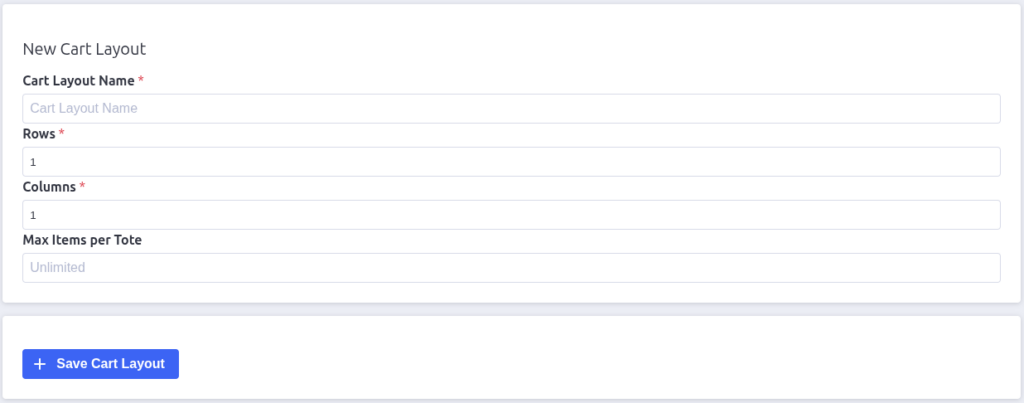
The cart layout form defines a picking cart: its name, its tote grid, and how
many items each tote can hold. It’s the same form whether you’re creating a
new layout or editing an existing one — editing just opens it with the fields
pre-filled.
Open it from App Settings → Cart Layouts → New Cart Layout, or click
Edit on a layout row.
The fields
Cart Layout Name (required)
A short, recognisable name — e.g. “Picking Cart A” or “Large trolley”. This
is what appears in the cart layout dropdowns on the Convert Order Shipments
page and in App Settings.
Rows and Columns (required)
The tote grid on the physical cart. A 2 × 3 cart holds up to 6 totes.
Minimum is 1 × 1.
Max Items per Tote
The most items one tote can hold before the shipment’s items spill into the
next tote. Leave it blank for unlimited — every item goes in one tote.
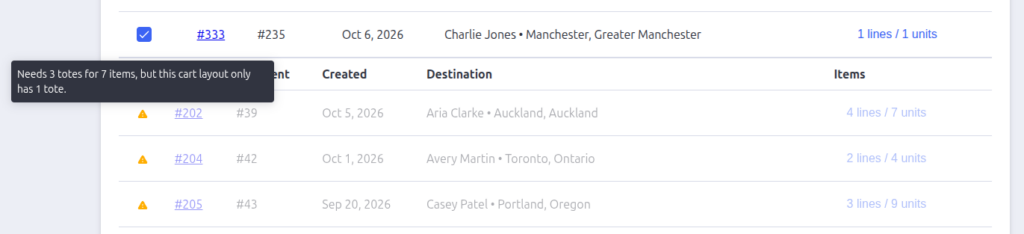
This number decides how many totes a shipment needs at conversion time:units ÷ max per tote, rounded up. If the result is more than
rows × columns, the shipment can’t be converted under this layout and gets
flagged on the Convert Order Shipments page.
Saving
- New layout: click Save Cart Layout.
- Editing: click Update Cart Layout.
You return to the Cart Layouts list when it saves.
Two things to know:
- The built-in default layout can’t be edited — opening its form shows a
notice instead. - Editing a layout doesn’t change batches or totes that already exist — it
only affects future conversions.
Tips
- Make layouts that match your real carts — the grid shown to pickers on the
warehouse app uses these positions, so accuracy keeps the screen honest. - A bigger cart + a per-tote limit gives tighter batches; a small cart +
unlimited totes is more forgiving for odd-sized shipments. - Keep at least one usable layout beyond the built-in default so the Convert
page has a sensible cart to offer.

Pack Perfect
Pack Perfect is coming soon! Email support@athousandapps.com to be added to the list and we’ll let you know as soon as it’s released.