
The Users page manages the employees who can log into the warehouse app
— the pickers, packers and returns staff on your floor. Each user has a login
name and a set of permissions controlling which parts of the app they can
see.
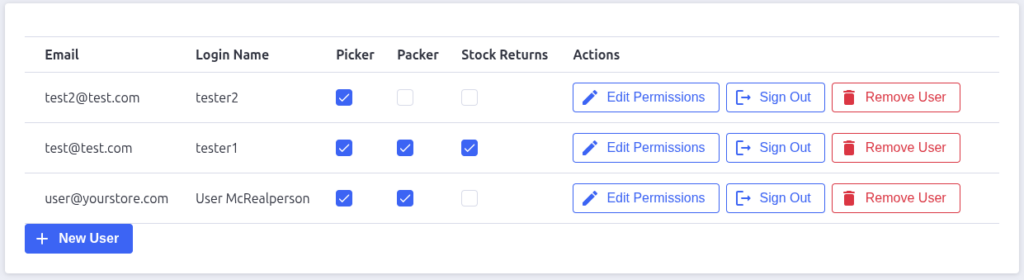
The user list
The table shows one row per warehouse user:
- Email — the user’s email address, used as their identity in the app
(it’s what shows on batch assignments, park events, and the audit log). - Login Name — what they type into the warehouse app’s login screen.
- Picker / Packer / Stock Returns — checkboxes showing which permissions
the user has. - Actions — Edit Permissions and Remove User.

Permissions
Each permission unlocks a workflow in the warehouse app:
| Permission | What the user can do |
|---|---|
| Picker | See the Picking tab — claim prepared batches, pick items, park and complete picks |
| Packer | See the Packing tab — claim picked batches, work packing checklists, mark batches packed |
| Stock Returns | See the Returns tab — claim to-return batches and process items back into stock |
Permissions are independent — a user can have any combination. A user sees
only the tabs they have permission for; if they land somewhere they shouldn’t,
they’re redirected.
Adding a user
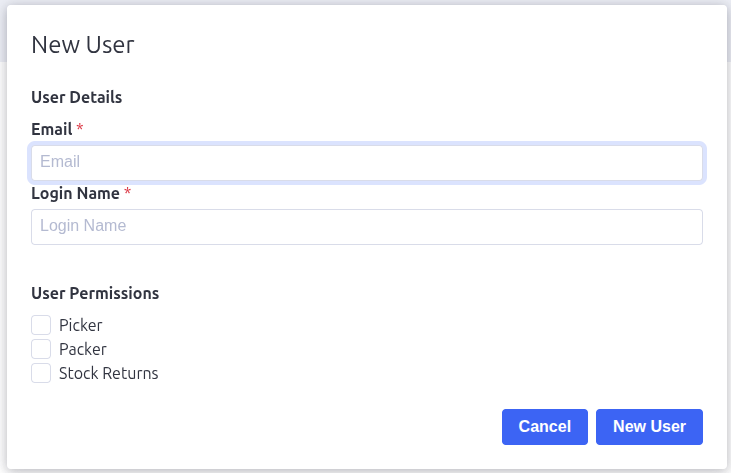
Click New User and fill in the dialog:
- Email (required)
- Login Name (required) — keep it short and easy to type on a mobile
keyboard. - User Permissions — tick Picker, Packer, and/or Stock
Returns.
Click New User in the dialog to save.
Note: a user alone isn’t enough to log in — they also need a valid
warehouse login code (see Warehouse Login Codes). Think of the user as
“who you are” and the code as “which warehouse you’re in”.
Editing and removing users
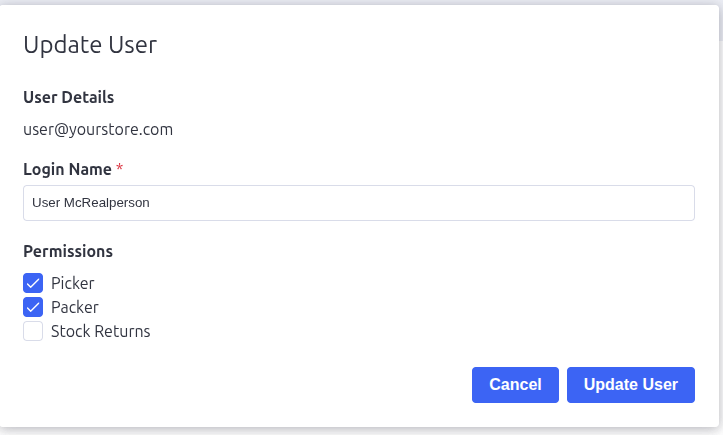
- Edit Permissions — reopens the dialog with the user’s current
permissions so you can grant or revoke roles without recreating the user. - Remove User — asks for confirmation, then deletes the user. They can no
longer log into the warehouse app.
Pack Perfect
Pack Perfect is coming soon! Email support@athousandapps.com to be added to the list and we’ll let you know as soon as it’s released.